SMS check-in allows self-employed drivers, partners, or occasional drivers to receive their assignments and check in for them.
Since January 2026, the WAY-D driver app has been reserved for drivers employed by companies with a WAY-Plan license. SMS check-in is the best alternative for continuing to track assignments in real time.
How does driver check-in via SMS work?
A link in each SMS directs the driver to a web page with the assignment details and a link to confirm check-in.
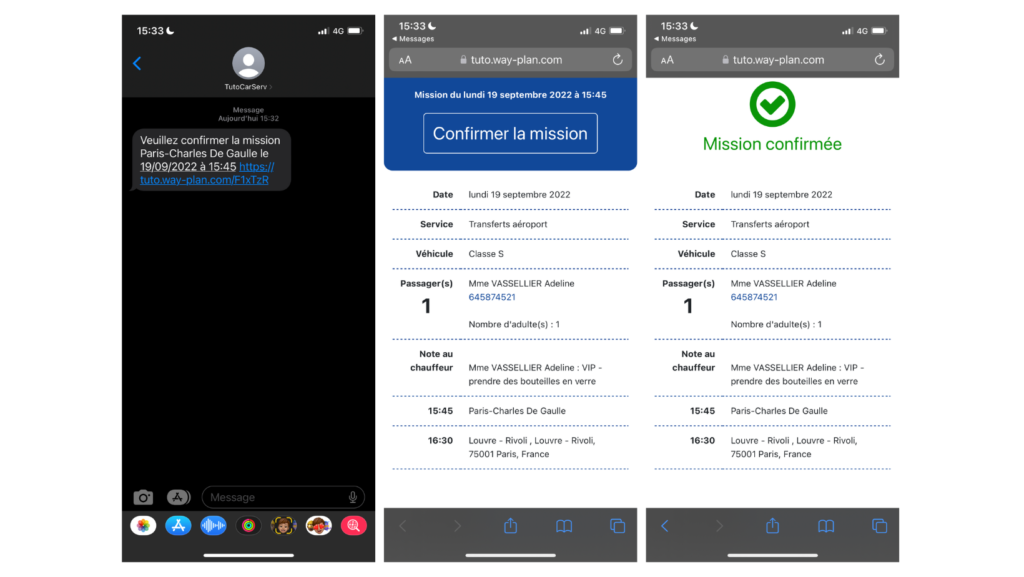
As soon as the driver confirms on the web page, the status of the assignment is changed on the schedule as if he had confirmed on the WAY-D app.
Good to know:
Developments have been implemented so that each SMS is counted as a maximum of 1 SMS sent per check-in.
Enable and configure SMS messages to be sent to drivers for their check-ins
Configure SMS texts
- Go to the SMS configuration page via the SMS menu > Configure SMS.
- The available configurations are grouped together in the “Check-in outside WAY-D” tab.
- Activate the desired sending rules:
- Send a text message to the driver as soon as the status changes to 5.
- Send a text message a few minutes before the start of the trip to confirm that the driver is on their way to the pick-up location.
- Send text messages to track each status change.
- In place
- Passenger on board
- Finished
For each SMS, you can modify the text that will be sent to the driver. This text can be modified for each language and can be supplemented with tags that will include elements of the mission concerned.
Simply click outside the box to confirm the text modification.
Configure drivers who will use SMS check-in
- Go to the list of drivers via the Driver > Driver menu.
- To configure the profile of an existing driver, click on their name.
- First, check that the driver's phone number is entered correctly with their country code.
- In the configuration section, check the “Enable SMS check-in” box.
- Click Edit to confirm this setting.
Test the configuration
We recommend that you test your configuration by creating a driver file and assigning yourself a job. This will allow you to confirm the steps involved so that you can then guide your drivers.
- Send this assignment to the driver by changing its status to 5.
The driver will instantly receive the corresponding text message with the confirmation web link. - By clicking on this link, the driver will access the detailed assignment sheet on a web page and confirm receipt. On the planning side, the status will then automatically change to status 6, “driver ok.”
- On the day of the assignment, the text message corresponding to status 7 “assignment started” will be sent according to the predefined time frame. The link contained in the text message will open the detailed assignment sheet at the “Start” stage.
- The driver will then receive SMS messages enabling real-time tracking according to the rules set in the SMS configuration page until the “Finish” stage, which indicates that the passengers have been dropped off.
Your customers can also track the progress of assignments on their dedicated space as soon as the status changes.
Your partners can also see the status of assignments on their schedule, in the case of an assignment received by the network or by GNET.
The “Driver check-in via SMS” feature is available on WAY-Plan from version 1.24, released in October 2022.
Comments
0 comments
Article is closed for comments.